Real-time Instance Status Tracking#
Architecture#
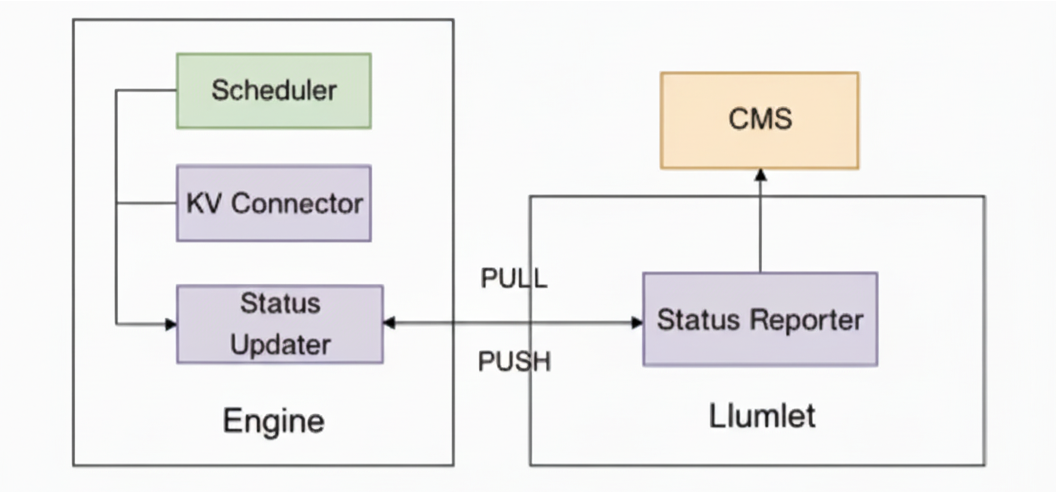 Llumnix introduces a centralized Cluster Meta Store (CMS) dedicated to caching instance metadata and real-time status. Within this architecture, Llumlet is responsible for aggregating data from the inference engine and updating the CMS.
To collect the engine’s real-time status, Llumnix requires access to internal states from components such as the Scheduler and KV Connector. Therefore, we have instrumented the engine with an internal Status Updater. This component supports both pushing status to Llumlet and allowing Llumlet to actively poll for updates. To ensure state freshness, the Status Updater’s update cycle is tightly coupled with the engine’s execution steps.
Data Sources and Collection Architecture#
Engine intrusive changes#
To capture real-time engine status, we implemented intrusive modifications to vLLM’s EngineCore.step() method. The solution introduces four trigger points within the step execution flow to ensure comprehensive monitoring while avoiding blocking scenarios caused by conditional checks or long-running tasks:
Step-Begine Phase (
StepPhase.STEP_BEGIN/StepPhase.BYPASS_STEP_BEGIN)Captures pre-execution engine state immediately when step processing initiates.
Before-Return Phase (
StepPhase.BEFORE_RETURN)Records final state metrics when scheduler queue is empty.
After-Scheduling Phase (
StepPhase.AFTER_SCHEDULE)Monitors system state immediately following
scheduler.schedule()completion
After-Update Phase (
StepPhase.AFTER_UPDATE)Tracks post-processing state after model output generation completes
These trigger points are all invoked through
llumlet_proxy.
Engine Interaction Modes#
The engine supports two status update modes (controlled by environment variable LLUMNIX_UPDATE_INSTANCE_STATUS_MODE), with push mode enabled by default:
Push Mode: If enabled, during initialization,
llumlet_proxyregisters a stub tollumlet, and actively pushes updated status tollumletimmediately after status changes occur.Pull Mode: If enabled,
llumlet_proxystill maintains status updates internally. Updatedllumlet’s scheduled task callsget_instance_statusand no active pushing occurs between polling intervals.
Heartbeat and Metrics Reporting#
Llumlet is responsible for reporting its schedulable status to the CMS, alongside real-time metrics. Although its primary update method is PUSH mode (when LLUMNIX_UPDATE_INSTANCE_STATUS_MODE=PUSH), it incorporates a crucial PULL-based health check as a fallback.
This mechanism activates when the engine is either idle (no requests) or appears unresponsive, having not pushed an instance_status within the timeout specified by LLUMNIX_ENGINE_GET_STATUS_TIMEOUT. In this scenario, llumlet proactively initiates a get_instance_status utility call to the engine.
If the engine responds promptly, it is confirmed to be idle but healthy, and thus remains schedulable. However, if this call times out, llumlet presumes the engine’s main loop is frozen or it has entered an abnormal state. It then sets the schedulable status to false, signaling the scheduler to respond to the potential failure.
Tracked status#
Based on Llumsched’s load balancing objectives (e.g., balancing batch size or token count), Llumlet needs to collect status such as the number of requests and number of cached tokens. More specifically, aligning with the request classification scheme of vLLM’s scheduler, we can categorize these statuses into those associated with running requests and waiting requests.
Running requests status: Metrics such as the number of running requests and token counts reflect the current engine load.
Waiting requests status: These metrics typically indicate the status of Prefill-Decode (PD) disaggregation or request migration. For example, the number of requests waiting for prefill on a decode instance. Such status can provide insight into the engine’s future workload, helping Llumsched avoid over-scheduling.
How to Use#
Standalone Metric Reporting: If you only need to use Llumnix for its metric reporting capabilities without integrating it with
LlumSched, you can enable it by setting the environmental variableVLLM_ENABLE_LLUMNIX=1when inference service is started.Full Cluster Deployment: For a full cluster deployment where Llumnix works in conjunction with the scheduler (
LlumSched), use thefull-mode-schedulingdeployment. In this mode,VLLM_ENABLE_LLUMNIX=1is already set in the vLLM deployment YAML.